A Router is a networking device that forwards packets to the intended IP destination on layer 3. The problem with computers is that we want to go all over the place but we need to travel through many networks to reach our destination. This where routers come into play. Routers allow us to connect and traverse through many different networks in a timely manner via packet forwarding.
Routers consult a routing table to know where to send packets that are not intended within its network For example we have the following topology:
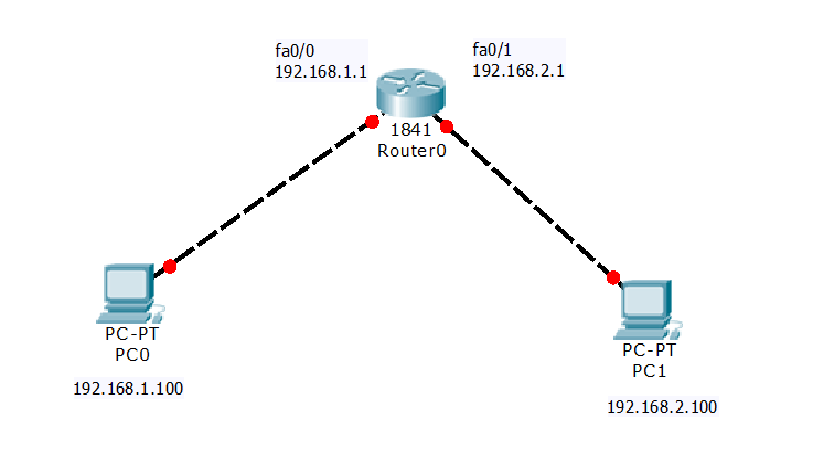
PC0 would like to communicate with PC1 via sending an ICMP packet to ping PC1 however they are on two different networks . A router is mandatory for them to communicate because they are on different networks regardless if we were to even establish a direct connection via ethernet because they are on two separate networks on the layer 3. The router will look at the destination address and see its intended for a IP on its network and forward the packet accordingly.
Routers use a routing table to know where to send packets that are not intended within its network when sending packets across router a route must be added. This can be done via routing protocols like OSPF which automatically update the routing table or be added manually. The syntax to add a route within Linux is as follows:
ip route add <network>/<prefix> via <gateway> dev <interface>You add the network you would like to be able to reach and the gateway that has a link there most likely via physical connection. I have noted an example down below.
ip route add 192.168.200.0/24 via 192.168.100.1

The best analogy to routing is like a relay race which requires passing the baton to sprint.
Creating your own router
The best way to understanding routers is to build your own router. Actually any computer has the ability to become a router it just has to be able to :
- Forward packets that are not destined to itself but other hosts
- Be able to masquerade and conduct NAT ( network address translation). # NAT can be an entire article btw.
We will demonstrate this using a simple linux machine that has two interfaces one connected to the internet and one connected to the local area network.
- # enable IP forwarding :
echo "net.ipv4.ip_forward=1" >> /etc/sysctl.conf && sysctl -p - # add a firewall rule to enable masquerading and network adddress translation which can be found below.
iptables -t nat -A POSTROUTING -o ens33 -j MASQUERADENow any machine on the local network can add our router’s IP address as a gateway and gain access to the world wide web 🌐
Security risks with routers
Routers are very sensitive devices because they often have many devices connected to them and often act as the bridge between the wide area network and the local area network. Therefore routers must be secured with the utmost care. Here are best practices for securing routers.
- Ensure all ports are closed for incoming connections
- Update Firmware
- Change Default Credentials
- Enable an IDS/IPS
In conclusion routers are network devices that allow devices to communicate across networks essentially providing them with access to the internet and world wide web. Therefore they should be secure with utmost care to prevent unauthorized access to local area networks.