Zakaria Abdirahman Osman

The Motherboard

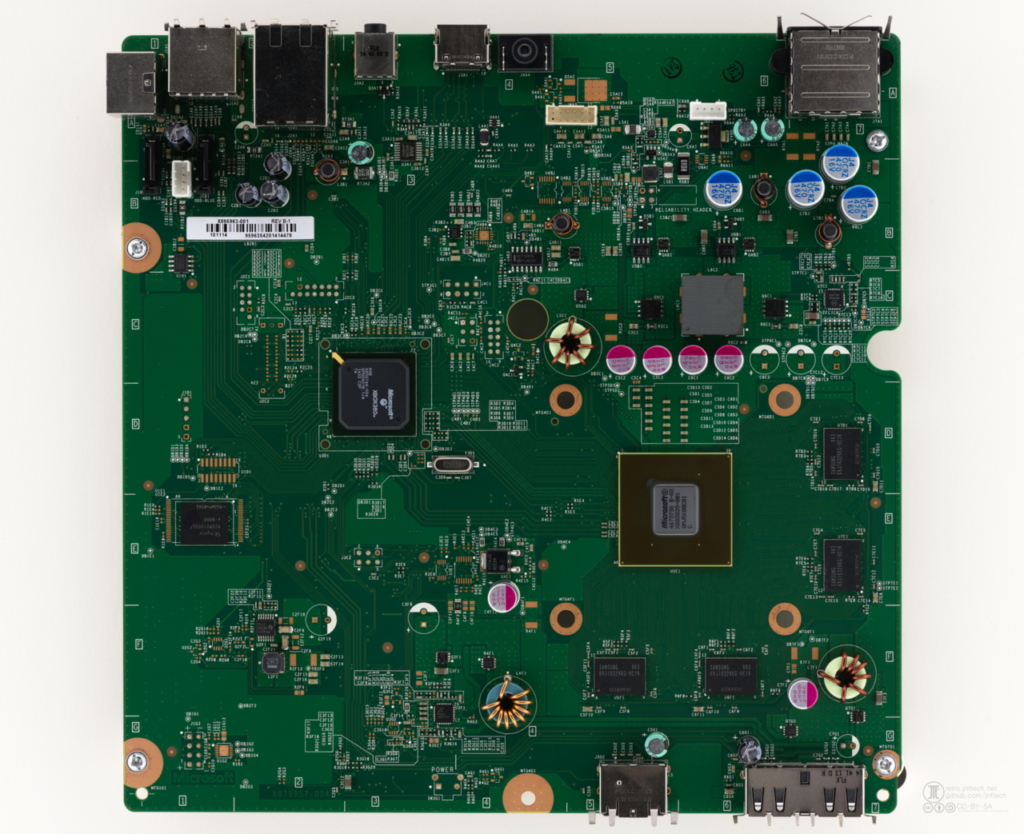
The motherboard is the the main printed circuit board in a computer having designated spots for the most important parts of the computer such as the CPU , RAM and allowing external connections to  peripherals like the mouse, keyboard and monitor. You can understand why it’s known as the motherboard because it holds the important parts of the computer like a mother holds her child. Lastly the motherboard is an electrical component and allows connections between the different parts of the computer.

Computer data storage – Hard drive

We have discussed the RAM in our last post and we have understood the concept the RAM is to be used temporarily hence the name random access memory. The question arises “What if we need to store something permanently?” This is where we use a hard drive to allow us to store data permanently.

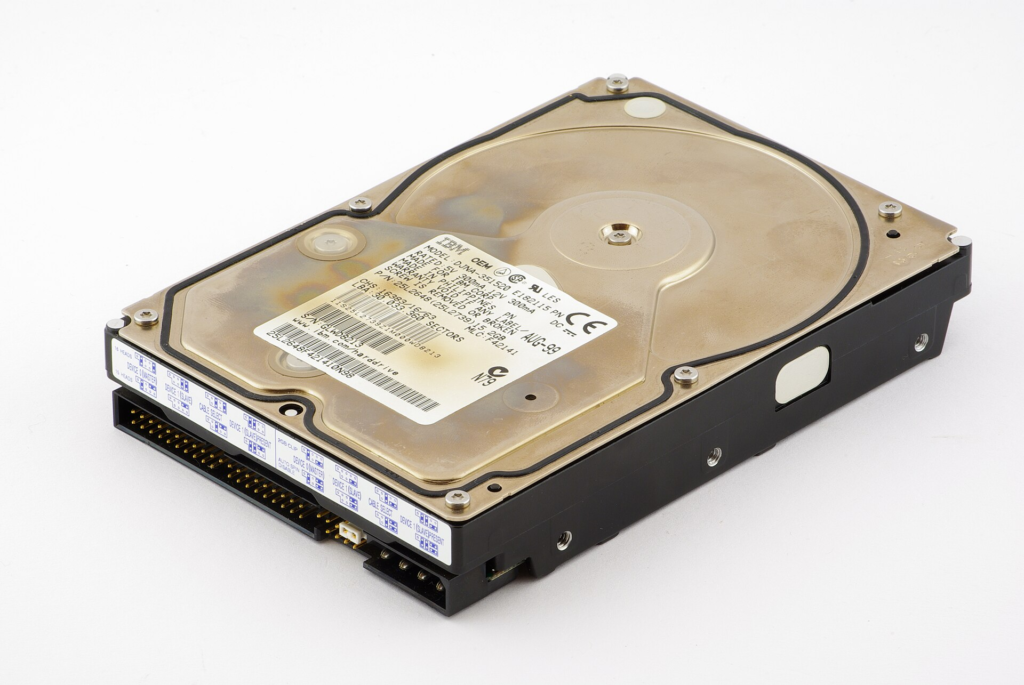
A Computer data storage is the retention of any digital data using technological devices. We use it everyday to store our files , folders and applications. In addition the code for your the operating system of your computer is also stored on your hard drive. A hard drive is essential for storing data and is the capacity comes in MB,GB and even TB. The unique thing about the hard drive is it works even when the computer is turned off unlike the RAM which is volatile and needs electricity to function.

There are two types of hard drives ,we have the traditional hard drive that uses electromechanical devices and fast spinning magnetic disks to read and write to data by moving the read and write head. Secondly we have the SSD which is more newer , faster and more advanced because it uses flash memory and has no moving parts. Moreover the computer storage can also be external where we use USB to connect it to the motherboard or it can internal inside the computer.

In conclusion a computer data storage allows us permanently store data such as files , folders and images. It works even without electricity and can be analyzed from other computers. Also it stores the operating system of your computer which can be Windows or Linux making it an essential part of the computer.

How to open a port using iptables – the secure way.

Enterprises often need servers to serve their clients across the world such as websites , databases or remote access servers. For example when you are viewing this site you are accessing my server’s public IP address on a specific port , most likely port 80. Therefore we are in desperate need to ensure we are server is secure and administrated in safe manner. The best way I can describe having port 80 open on a public IP address is like putting a nice donut on the open road but that donut is covered and secured by a glass box and you can only see it through a tiny hole. That tiny hole is port 80. Imagine how much people would try to break that glass and take that tasty donut especially in less safe areas. Therefore this article will teach you the most secure way to open a port using iptables.

What is a firewall?

A firewall is a network security device that monitors, filters, and controls incoming and outgoing network traffic[1]. The main purpose is to act as barrier between external networks and internal networks or any network in fact. It is often placed on critical areas such as between networks or routers. Moreover another type of firewall is a host-based firewall which is a software application installed directly on a single host to monitor and filter its inbound and outbound network traffic rather than a whole network [2]. Therefore the point is to simply prevent unauthorized incoming and outgoing traffic on hosts and networks to help secure them further. It is kind of like a border you do not need everyone coming in , you must be able to dicatate who comes in and who comes out to have a safe country , the same idea applies to a network. Iptables is a host based firewall application based on Linux systems. It has direct access to the net filter Linux kernel which is a separate post on its own which I intend to complete in the near future. For this post we will simply demonstrate how to secure a webserver using iptables leaving out the theory on

Practical application

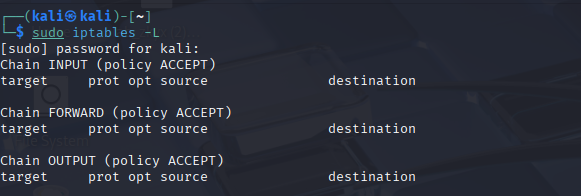
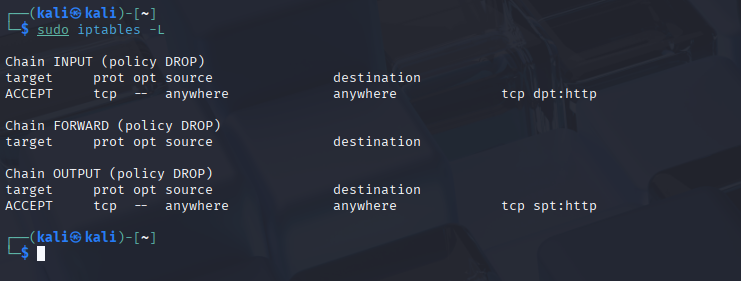
It is best practice for every host to ensure that only authorized traffic is allowed on both incoming and outgoing connections. That means that iptables should default be on drop meaning all ports are closed by default and you open strictly the ports that are needed. For iptables we have three chains , the first chain deals with incoming connections this means connections that are entering your system. The second chain is the output chain which deals with all connections that are destined for machines on the outside. Lastly the the forward chain deals with any packet that is not destined to the host machine itself.

Setting up our webserver

First we must update our kali linux machine using the command:

sudo apt update -y

Secondly we must install the software which we will be using apache2

sudo apt install apache2

By default it is disabled meaning it is not running nor accessible to anyone to enable it run the command:

sudo systemctl enable apache2

Opening ports

Now from experience I know a webserver on apache2 uses port 80 and if configured it can also use port 443 to serve it’s clients on a secure connection. Therefore for this lab we will be using only port 80 and will be opening only this port. To allow others to access port 80 on our IP address we can use the following command

sudo iptables -A INPUT -p tcp --dport 80 -j ACCEPT

sudo: Runs the command with root (administrator) privileges.
iptables: The built-in Linux administration tool for IPv4 packet filtering.
-A INPUT: Appends the new rule to the end of the specified chain (e.g., INPUT).
-p tcp: Matches packets using the TCP protocol.
--dport 80: Matches traffic targeting destination port 80 (standard HTTP).
-j ACCEPT: Tells the firewall to jump to the ACCEPT target, letting the traffic pass through.

Great! Now others can access our webserver on port 80 , however our default policy for iptables is to allow all traffic this can be quite dangerous if we have other services running like SSH that we did not intend the public to access.

Securing our webserver

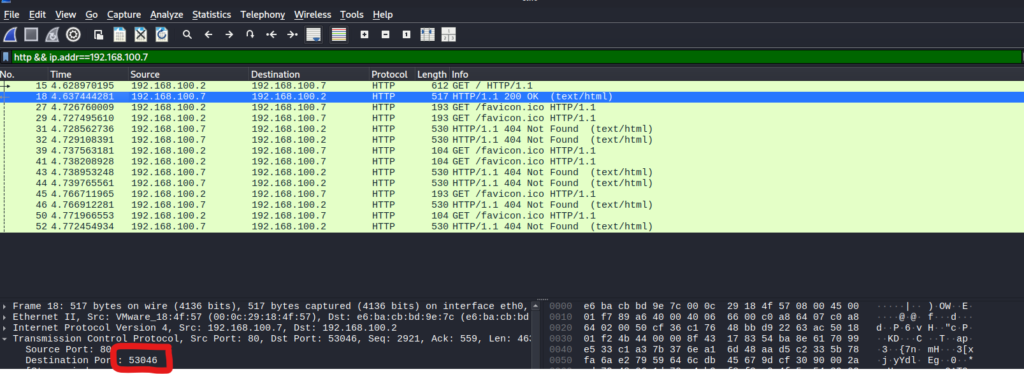
It is best to understand your application to know what port it is using on both the input and output chain. We can use Wireshark ( a packet sniffing tool) to conduct such testing. We can know access it from another machine while sniffing for packets.

One important detail to analyze is that our webserver uses port 80 to send packets used to facilitate connections between the client and itself. This is because the client operating system The client operating system chooses a random ephemeral port between 49152 and 65535 for outbound connections. So our webserver will use port 80 to reply to our client. Now we can set our iptables to default drop all connections but allow only:

  1. Connections coming to our webserver via port 80
  2. Connections coming from our webserver to reply to the client on source port 80

We have already applied the 1st firewall rule , now we can apply the second one on the output chain and change it to source port instead of destination port.

sudo iptables -A OUTPUT -p tcp --sport 80 -j ACCEPT

We can set our iptables default policy to drop all connections , this means only authorized traffic will be allowed into our machine and our webserver will also work , it is also good to allow localhost to work to prevent glitches , we can do this by:

iptables -A INPUT -i lo -j ACCEPT

Great our website works and it safe from all of those outsiders. Thanks for reading and have a great day.

[1] https://www.fortinet.com/resources/cyberglossary/firewall

[2] https://nordvpn.com/cybersecurity/glossary/host-based-firewall/?srsltid=AfmBOopFRnsXjgOc5Rf4EWoJpt8NLQoAH2EjmkjZ1le1_lRNEzUEa0Hc

Propositional logic

Logic is the foundation for mathematical reasoning and is used heavily within the fields of computing , artificial intelligence and computer architecture. For example the arithmetic logic unit or ALU is designed using logic and performs arithmetic and bitwise operations on integer binary numbers within CPUs (Central Processing Unit). 

Figure 1 – Design of ALU using logic gates

A proposition begins with a declarative statement that declares that something is either true or false but not both. For example: 

  1.  Toronto is the capital of Canada (False)
  2. Washington D.C is the capital of the U.S.A (True)
  3. 1+1 =2 

However some statements are not propositions because they do not declare anything such as : 

  1. What time is it ?
  2. x + 1 = 2
  3. x + y = z

For propositions we use letters to denote propositional values which are p, q, r, s, . . . . In addition we use the letters T and F to denote True and False within truth tables.

Negation is denoted as ¬ (sometimes also written as ~) it turns a statement or a bit from true to false or false to true. For example , let P be a proposition. The negation of p , denoted by ¬ p will be it is not the case that p. 

Example 2:  Find the negation of the proposition “Micheal’s PC runs Linux” 

Solution: The negation of the proposition is “Micheal’s PC does not run Linux”

Also a proposition that is already negated will become true as a double negation reverses the original change. 

Conjunction

In the English grammar conjunctions are words like ‘but’,’and’,’or’ etc. that join two separate clauses.  In terms of discrete mathematics the conjunction of p and q is denoted by p ∧ q  and read as p “and” q. In order for a conjunction to be true both propositions must be true.

QP Q
TTT
TFF
FTF
FFF


 Disjunction

A disjunction is read p or q  and is written as  p ∨ q and is true whenever one of the two propositions is true. For example we have the proposition :

P: I am going to work

Q: I am going to school 

As long as at least one of the two propositions is true, then the whole combined statement ( p ∨ q )  is true. However, if both propositions are false, then the whole combined statement is false.

QP ∨ Q
TTT
TFT
FTT
FFF

Figure 3 – Truth table for OR

Inclusive “OR”

Inclusive OR is written as p ∨ q   and refers to the disjunction above.

Exclusive “OR”

Exclusive OR is usually written as: P ⊕ Q. Only one of the conditions can be true, not both , for example: You get (only)  soup or (only) salad with your meal ( cannot get both). 

QP Q
TTF
TFT
FTT
FFF

Implication

Any if then statement is an implication The implication of propositions p and q is denoted as p→q and read as “if p then q” or “p implies q”. The hypothesis is p ( the if part) and the conclusion is q ( the then part). When the hypothesis is true then the conclusion must be true for the implication to be true. For example if you take out the trash then you get a dollar.

P: if you take out the trash

Q: you will  get a dollar

Any time the hypothesis is false will be true because you can get a dollar for any reason regardless if you did not take out the trash plus it is not part of our condition and if you did not take out the trash and you did not get a dollar than it is true because you never did the if statement anyways.*

QP→Q
TTT
TFF
FTT
FFT

Converse

Converse is the opposite of Inverse in terms of the order of P and Q. It is read as   Q→P

P: if it rains today

Q: I will stay at home

Will be : If I will stay at home then it rains today

QQ →P
TTT
TFF
FTF
FFT

PS: the converse and the implication have the same truth table

Inverse

Inverse is the negation of the conditional statement. If ~ not P then ~ Q.

P: If you live in Los Angeles

Q: You live in California

If you do not live in Los Angeles then you do not live in California.

This inverse is false because you can live in other cities such as San Diego or San Francisco and still live in California.

Contrapositive

Inverse is the negation of the converse statement. If ~ not Q then ~ P.

P: If you live in Los Angeles

Q: You live in California

If you do not live in California  then you do not live in  Los Angeles.

This contrapositive is true because you must live in the state of California to live in the city of Los Angles.

  Biconditional 

 A biconditional statement occurs when the implication p→q and the converse Q→P are equivalent either true or false.

Implication :   If i studied for my exam then I will pass.

Converse: If I passed than I studied for my exam

As you can see both are true , therefore it becomes a biconditional. 

Example

I will pass if and only if I study hard.
p↔q

Guide for dealing with negative integers

What is an integer?

An integer includes all positive numbers , 0 and negative numbers excluding fractions and decimals.

This can be represented using the mathematical set down below containing all integers until infinity.

={,2,1,0,1,2,}\mathbb{Z} = \{\dots, -2, -1, 0, 1, 2, \dots\}

How can a number be negative?

Numbers can be negative in many real world scenarios and is used in many real world applications such as finance , weather etc.

For example you have $5 in your bank account and your bank allows you to make purchases larger than your account balance with the condition that it will become debt. You buy a something that costs more than you have like a $6 dollar soda, then you will inevitably be in debt by $1 because you will owe $1 to the bank, we can write this as:

56=15 – 6 = -1

The question may arise why is it negative or how can we subtract a number larger than it self , as we always teach our grade 2 and 3 students never subtract the larger number. Today we are bending the laws of reality for a bit.

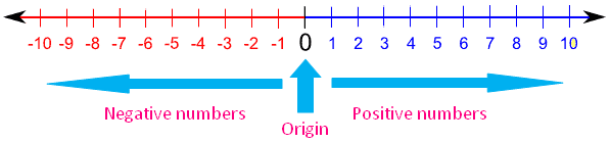
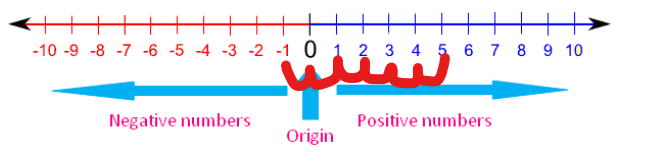
We can use a number line to prove this as we can go left 6 times on the number line eventually landing on -1

RAM – Random Access Memory

The next part of the computer we will be discussing is the Random Access Memory.

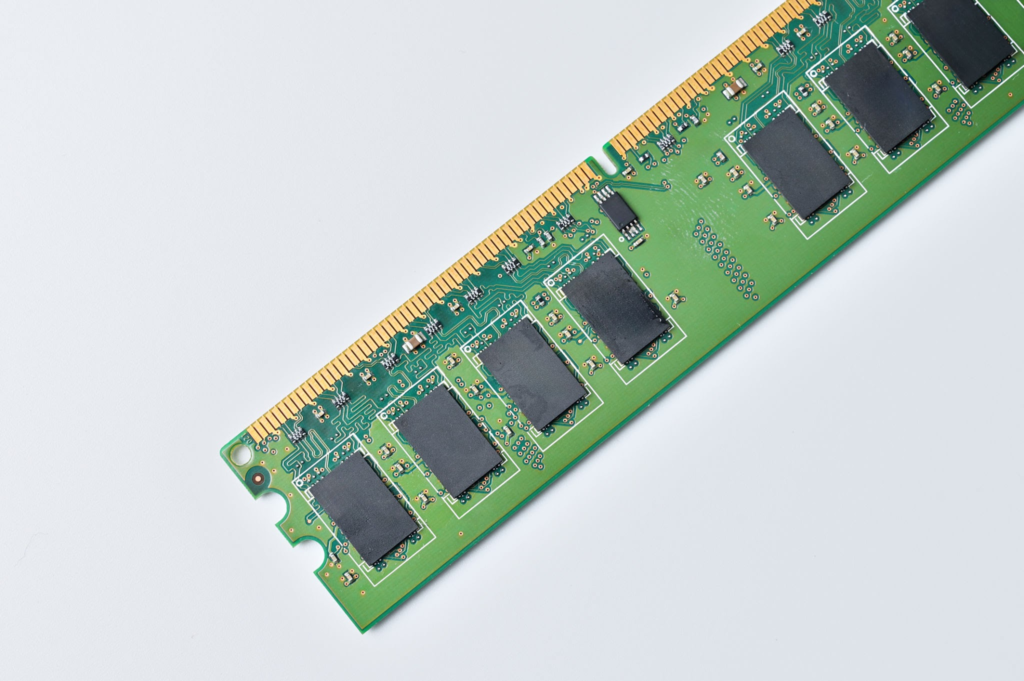
RAM stands for Random Access Memory and is the short term memory of the computer while the hard drive is the long term memory and storage for the computer. The problem is applications hold data and the CPU needs to access those files at high speeds, it would be way too slow for it to fetch from the hard drive which can be as large as 1TB. Therefore the RAM acts as an assistant to the CPU holding data from popular applications like Google Chrome or Microsoft Word so the CPU can access it at a suitable speed.

For example, if we need to compute:

2 + 2

The keyboard sends the input to the application.

The data is temporarily stored in RAM.

The CPU reads the data from RAM.

The CPU performs the addition (2 + 2 = 4).

The result (4) is sent to the display and shown on your screen.

RAM needs electricity to work, if we shut off the computer all of that data is lost instantly, unlike a hard drive where we will most likely have the data without electricity or the computer being on.

Most computers have a limited amount of RAM such as 4GB, 8GB, 16GB etc. Therefore if we overwork the computer we can run out of random access memory i.e. the space the CPU needs to grab instructions from causing our computer to not operate effectively. This means the computer has less free RAM available to store and quickly access the instructions and data it needs causing applications to become slow, unresponsive or even in extreme cases crash.

In conclusion the RAM is a fast temporary memory space that is utilized by the CPU to process data and complete the instructions that the data contains while the Hard drive is the main storage that is larger and is designed to hold data, files and applications.


Introduction to computer science

A computer is an electronic device that manipulates information and is often used to run programs , compute arithmetic operations. Computers only can read 1s and 0s via transistors rather than human readable text and use them to create amazing things. Computers use a mix of both hardware and software to make many of the amazing things we do today possible. We will discuss each part of the computer and it’s role in making computers work magically.

CPU – Central processing unit

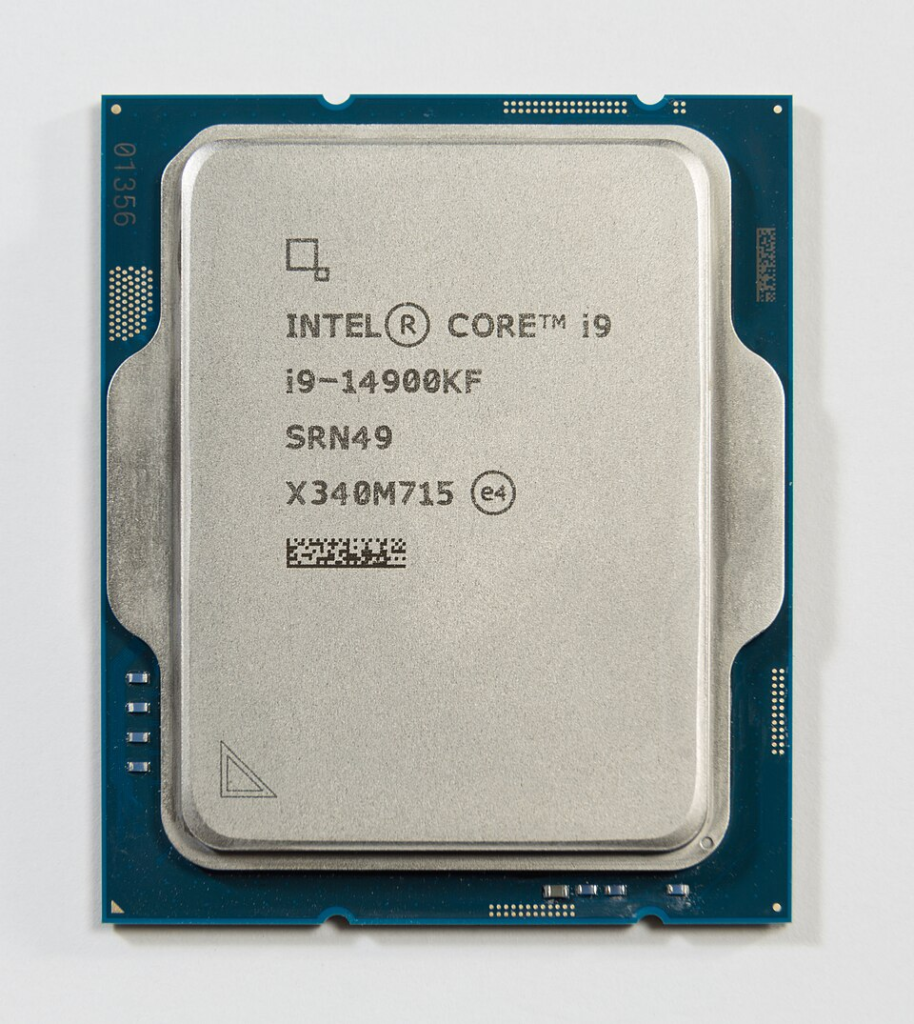
The CPU is known as the brain of the computer 🧠 , when ever we write cool programs like Python or C , they are translated to machine code that looks like this ‘10111000 00000101 00000000 00000000 00000000' because the CPU can only read 1s and 0s. Moreover the ALU ( Arithmetic Logic Unit) a small component built using logic sits within the CPU and handles the mathematical operations such as addition, subtraction, multiplication, and division, as well as logical operations, such as comparing values greater than, less than, or equal to allowing us to compute numbers at rapid speed. In conclusion the CPU is the powerhouse of the computer allowing it to execute instructions and compute mathematical and logical operations.

What is a router ? – practically explained

A Router is a networking device that forwards packets to the intended IP destination on layer 3. The problem with computers is that we want to go all over the place but we need to travel through many networks to reach our destination. This where routers come into play. Routers allow us to connect and traverse through many different networks in a timely manner via packet forwarding.

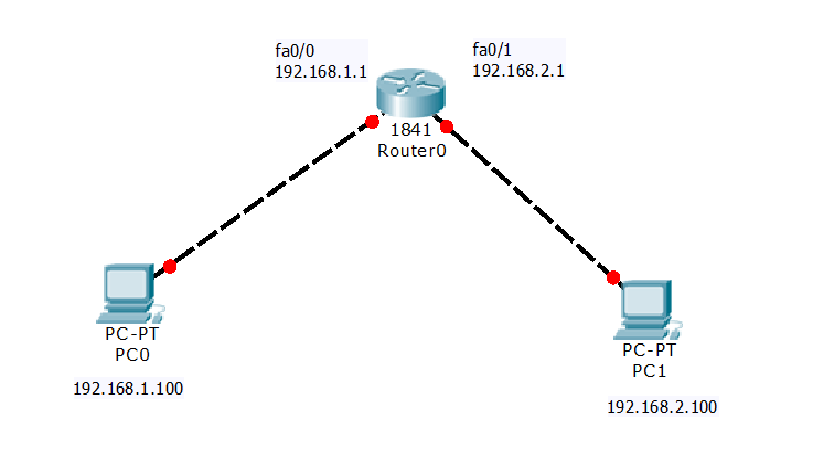
Routers consult a routing table to know where to send packets that are not intended within its network For example we have the following topology:

PC0 would like to communicate with PC1 via sending an ICMP packet to ping PC1 however they are on two different networks . A router is mandatory for them to communicate because they are on different networks regardless if we were to even establish a direct connection via ethernet because they are on two separate networks on the layer 3. The router will look at the destination address and see its intended for a IP on its network and forward the packet accordingly.

Routers use a routing table to know where to send packets that are not intended within its network when sending packets across router a route must be added. This can be done via routing protocols like OSPF which automatically update the routing table or be added manually. The syntax to add a route within Linux is as follows:

ip route add <network>/<prefix> via <gateway> dev <interface>

You add the network you would like to be able to reach and the gateway that has a link there most likely via physical connection. I have noted an example down below.

ip route add 192.168.200.0/24 via 192.168.100.1

The best analogy to routing is like a relay race which requires passing the baton to sprint.

Creating your own router

The best way to understanding routers is to build your own router. Actually any computer has the ability to become a router it just has to be able to :

  1. Forward packets that are not destined to itself but other hosts
  2. Be able to masquerade and conduct NAT ( network address translation). # NAT can be an entire article btw.

We will demonstrate this using a simple linux machine that has two interfaces one connected to the internet and one connected to the local area network.

  1. # enable IP forwarding : echo "net.ipv4.ip_forward=1" >> /etc/sysctl.conf && sysctl -p
  2. # add a firewall rule to enable masquerading and network adddress translation which can be found below.
iptables -t nat -A POSTROUTING -o ens33 -j MASQUERADE

Now any machine on the local network can add our router’s IP address as a gateway and gain access to the world wide web 🌐

Security risks with routers

Routers are very sensitive devices because they often have many devices connected to them and often act as the bridge between the wide area network and the local area network. Therefore routers must be secured with the utmost care. Here are best practices for securing routers.

  1. Ensure all ports are closed for incoming connections
  2. Update Firmware
  3. Change Default Credentials
  4. Enable an IDS/IPS

In conclusion routers are network devices that allow devices to communicate across networks essentially providing them with access to the internet and world wide web. Therefore they should be secure with utmost care to prevent unauthorized access to local area networks.